Self-Hosting Next.js and Payload on One VPS: What Broke
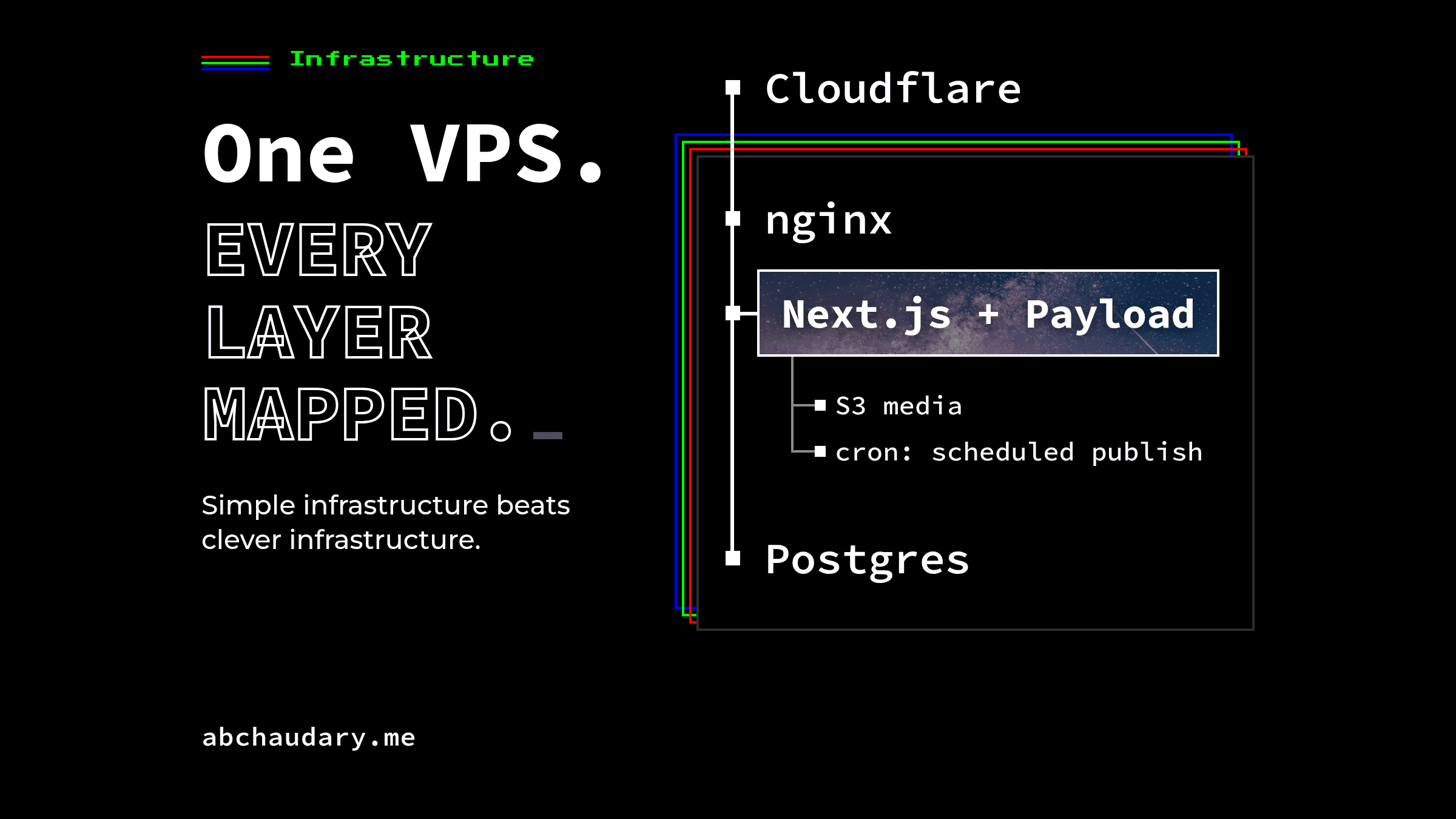
How one VPS runs Next.js and Payload behind Cloudflare and nginx: the request path, why the build needs a self-hosted runner, migrations on deploy, scheduled publishing, and what is not covered.
TL;DR: Just after a deploy that had passed its migration step, its health check and its smoke test, /admin on this self-hosted Next.js and Payload site rendered a blank white page in production: no console errors, no failed requests, every asset returning 200. The committed importMap.js had been generated without the S3 environment variables present, so the upload handler Payload's admin UI needed was never registered. That was one of three production-only failures on this stack: one VPS running Docker, nginx, Next.js and Payload behind Cloudflare. The system around them: the request path, a database migration on every deploy, a self-hosted GitHub Actions runner that exists for exactly one reason, and scheduled publishing through Payload's jobs endpoint instead of its in-process job runner.
How Does a Request Reach Next.js and Payload on One VPS?
A request to abchaudary.me passes through five layers before it reaches a database: Cloudflare, TLS termination and nginx, a reverse-proxy hop to a loopback port, the Next.js and Payload app container, and Postgres, with an S3-compatible store sitting off to the side for media.
- Cloudflare: DNS and the public-facing TLS edge.
- nginx: origin TLS via
certbot --nginx --expand, coveringabchaudary.meandwww.abchaudary.me, auto-renewing.proxy_passforwards to a loopback port, withUpgrade/Connectionheaders set for anything beyond plain request/response. - The app container: Next.js and Payload run in the same process, so nginx routes to one container.
- Postgres: a dedicated
postgres:17-alpinecontainer, bound to loopback only, on its own Docker network, kept separate so nothing else on the box can take this database down with it. - An S3-compatible store: reachable only from inside its own Docker network, for media. Payload's production deployment guide explains why this exists at all: "any files uploaded to your server only last until the server restarts or shuts down" on an ephemeral filesystem, so local disk was never an option here.
client_max_body_size in nginx is set to 16MB, double Payload's 8MB upload cap, so nginx never rejects an upload Payload would have accepted.
A free-port scan proves a port is free. It does not prove the container bound it. The first vhost returned 502 until proxy_pass was corrected the same day: ss -tlnp had shown the chosen port free, which said nothing about where the app container was actually listening.
Is One VPS Enough for Next.js and Payload?
One VPS is enough for this site's current traffic, on a box that was never single-purpose. Other applications were already running on it before this site arrived; this site added its app container and its own Postgres, and shares the existing reverse proxy and S3-compatible store.
As of 2026-09-04, the day the host was prepared, it had roughly 470GB of disk free and roughly 49GB of RAM available. That's a snapshot from setup day, and at this site's traffic nothing on the box competes with the app for resources.
The sizing targets one app at its current traffic, on headroom shared with stacks that were already there. Scaling past that is covered in the last section.
Why Does the Next.js Build Need a Self-Hosted Runner?
The build runs on a self-hosted GitHub Actions runner, installed on the production host itself, because next build reads the database directly, and a GitHub-hosted runner has no network path to a Postgres container that lives only inside this host's own Docker networks.
Nine routes call generateStaticParams and prerender at build time, reading Payload's data for their param lists: projects/[slug], blog/[slug], tags/[slug], authors/[slug], and the paginated blog and photo routes. The workflow's own top-of-file comment states the constraint directly: "It has to run there, not on a GitHub-hosted runner: the image build queries Payload to prerender nine generateStaticParams routes, so it needs direct network access to" the production Postgres container.
That connection is supplied as a BuildKit secret, RUN --mount=type=secret, mounted only for the life of one RUN instruction, never a plain build ARG, so it never lands in image history. It also isn't the connection string the running app uses. DATABASE_URI_BUILD reaches Postgres by its host-bound loopback address, which is why the build needs network: host; the running container reaches the same database by its Docker service name, on the app's own network. Two values, one database, because the build and the runtime container sit on different sides of the host's networking.
Payload's production deployment doc documents an alternative: building without a database connection, for teams that "don't want to have a DB connection" during the build. This repo doesn't use it, on purpose: nine routes with real query-backed param lists is a genuine dependency, and a self-hosted runner with direct database access meets that dependency instead of routing around it.
What Happens to the Database on Every Deploy?
Every deploy runs npx payload migrate before the image is even built, against the build-time database connection, and production's schema didn't start from a migration at all: it was baselined once by hand, with a single row inserted into payload_migrations recording an initial migration that had already run.
Standing that pipeline up produced the first of this setup's real failures. The deploy pipeline and its first migration went in together on 2026-09-07, and the migrate step hung. The first fix guessed a missing warning flag and added --force-accept-warning; it didn't fix it. The second fix guessed a process that finished but never exited, and wrapped the step in a timeout that accepted exit code 124 as success; that papered over the symptom. The actual cause, found the same session: a stray dev marker row sat in payload_migrations on both databases, left over from an earlier dev-mode schema push, and --force-accept-warning was never wired to the plain migrate command in Payload's CLI, only to migrate:create and migrate:fresh. With the marker row present, payload migrate stops at an interactive "data loss will occur, proceed? (y/N)" prompt that no CI runner can answer. Deleting that row was the real fix: the step is now a plain npx payload migrate with both wrong fixes removed, it exits cleanly on its own (exit 0, in about 20ms), and its inline comment in deploy.yml records why it hung.
A second, unrelated failure showed up the same evening, once migrations were green: a deploy could pass build, migrate and smoke test and still serve stale content, because Docker's layer cache has no visibility into a database change. I've written that one up on its own, since the mechanism deserves the full explanation: Green Deploy, Stale Page: Docker's Layer Cache, Not Next.js.
The third failure opened this article: /admin rendered completely blank after a deploy that had passed every check. importMap.js, the file Payload generates to wire up its admin UI and that this repo commits to git, had been generated without the S3 environment variables present, so the S3 upload handler was never registered, and the admin UI had nothing to render against. It was root-caused by reproducing it byte-for-byte: a local container built from the same Dockerfile, with production's real environment variables, until the blank page reappeared on purpose. The fix landed at 01:01 CEST on 2026-09-08, in commit cb94add, and it made the problem un-driftable: the Dockerfile now runs payload generate:importmap against the same build-time secret immediately before npm run build, so the import map is regenerated with production's real environment on every deploy.
How Does a Scheduled Post Actually Go Live?
A scheduled post goes live through a Payload job, queued when the post is scheduled and executed when a host cron job calls /api/payload-jobs/run with a bearer secret, once every minute.
versions.drafts.schedulePublish: true is applied to the Posts collection through a shared config, giving the admin UI its native "Schedule publish" control. Scheduling a post doesn't publish anything by itself: it queues a one-off job that waits for the chosen time, and something still has to run that job. Payload's job schedules doc draws the same line for recurring schedules, which "only creates (enqueues) the Job according to your cron expression. It does not immediately execute any business logic."
Here an endpoint runs it, and the choice over Payload's in-process jobs.autoRun is deliberate. Payload's jobs-queue overview lists three documented ways to run queued jobs: autoRun on a dedicated, always-on process, a bin script, or API endpoints "called by external cron services." This setup uses the third, and the reason is specific: publishing a post fires afterChange revalidation hooks, and Next.js's revalidatePath needs a request context to run in. An in-process autoRun job has none; it throws a "static generation store missing" error, the hook swallows it, and the blog index, sitemap and llms.txt stay stale with nothing in the logs pointing at why. Same class of bug as the deploy-time cache problem above: something ran successfully and the output was still wrong.
The access check that guards the endpoint:
// src/payload/jobs/index.ts
export function hasCronBearer(req: Pick<PayloadRequest, 'headers'>, secret: string | undefined): boolean {
  if (!secret) return false;
  const header = req.headers.get('authorization') ?? '';
  const expected = Buffer.from(`Bearer ${secret}`);
  const received = Buffer.from(header);
  return received.length === expected.length && timingSafeEqual(received, expected);
}

export const buildJobsConfig = (cronSecret: string | undefined): SanitizedConfig['jobs'] =>
  ({
    access: {
      run: ({ req }: { req: PayloadRequest }) =>
        hasCronBearer(req, cronSecret) || isAdminUser(getActor(req)),
    },
  }) as SanitizedConfig['jobs'];
And the cron side, sanitised:
# sanitised: /etc/cron.d/<app>-payload-jobs
* * * * * root <app-dir>/run-payload-jobs.sh

# sanitised: run-payload-jobs.sh
curl -sf -X GET "http://127.0.0.1:<port>/api/payload-jobs/run" \
  -H "Authorization: Bearer ${CRON_SECRET}"
hasCronBearer compares the whole Bearer <secret> header, checks length before timingSafeEqual so a mismatched-length header never reaches the constant-time comparison, refuses outright when no secret is configured, and the access rule falls back to a signed-in admin so the endpoint also works from the browser during manual testing. Anything else gets a 401. Verified on a throwaway database: no token, 401; wrong token, 401; correct secret, 200, with the post published and no revalidation error in the logs. The bearer-comparison logic has its own unit tests too.
What Does This Setup Deliberately Not Handle?
This setup is not trying to be multi-region or highly available, and every choice in it reflects that scope, not an oversight. One VPS, one app instance, one Postgres container: the design fits the traffic this project has today, and the places it would need to change are specific, not vague.
A second app instance would mean picking up concerns this single-instance setup has never had to solve. Next.js's own self-hosting guide names them for multi-server deployments: version skew between instances during a rolling deploy, and cache coordination, since by default Next.js "uses an in-memory cache that is not shared across instances" unless a custom cache handler points it at external storage. None of that applies with one instance behind one nginx; it all would the day a second instance joins.
nginx has one more job the same guide calls out that already applies at a single instance: streaming responses need buffering disabled, or nginx holds a response until it's complete instead of forwarding it as it streams, documented with the X-Accel-Buffering: no header. A per-response header, not a scaling concern, but a good example of the kind of nginx detail that stays relevant at any instance count.
The setup this article describes answers one question well: what does a request pass through, and what does each layer own. It has never needed to answer the second question, what happens when there's more than one app instance, because it has never needed more than one.
Five layers, one box, three production-only failures, all fixed. It hasn't needed a second VPS yet. If you've run Next.js and Payload past the point one shared box could carry it, what was the first piece you pulled off?
References
- Next.js self-hosting guide: the reverse-proxy recommendation, the streaming buffering note, and the multi-server deployment concerns (version skew, cache coordination) cited to state accurately that this single-instance setup has never had to solve them.
- Payload production deployment doc: the
output: 'standalone'requirement, the ephemeral-filesystem warning behind the S3-compatible media store, and the documented option to build without a database connection. - Payload jobs queue overview: the three documented ways to run queued jobs, including the endpoint pattern "called by external cron services" this setup uses.
- Payload job schedules doc: the queuing-versus-execution distinction, and the endpoint-based execution trigger alongside
autoRunand bin scripts. - The abchaudary.me case study and this project's own deploy workflow and infrastructure notes (
Dockerfile,.github/workflows/deploy.yml, commits1c47b84,6ce94d0,4c5977b,cb3d2d7,cb94add,4a06ddd): the primary source for the incidents and the scheduled-publishing implementation described above.